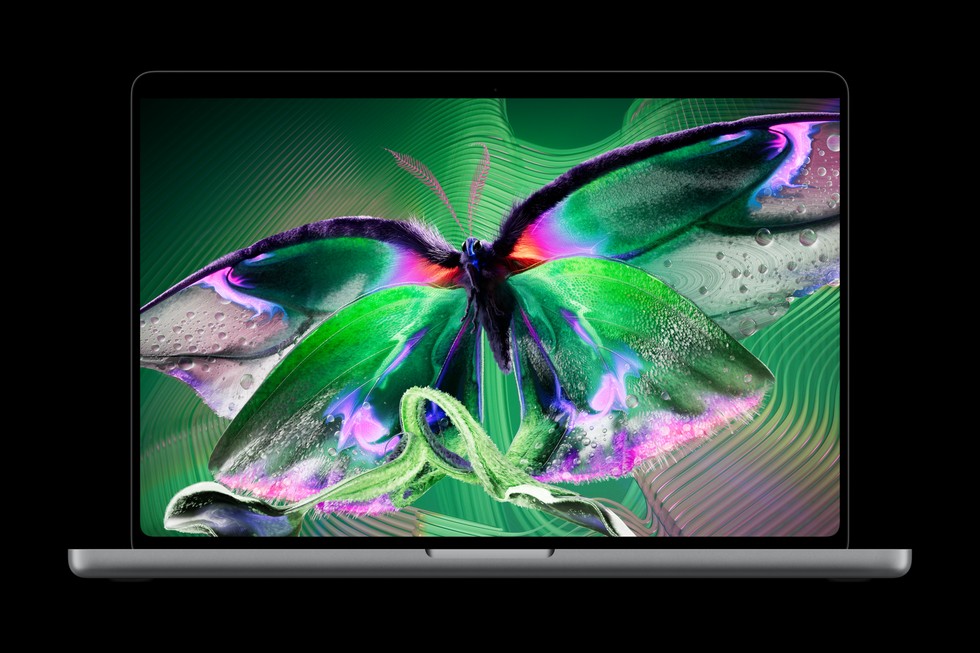
Apple’s new MacBook Pro with PROLED XDR Display is the sort of launch that makes an older laptop suddenly feel older. An OLED screen, touch input and a lighter design are easy to understand in a photograph. Whether they justify replacing a working computer is a more personal question.
With the announcement fresh and the first deliveries still ahead, this guide separates the launch facts from the buying decision. It is an analysis of Apple’s published information, not a hands-on review. We have not tested this model’s screen, battery life, thermals or long-term reliability.
The launch facts that matter
Apple announced the new 14- and 16-inch MacBook Pro with PROLED XDR Display on 28 October 2026. It combines tandem OLED with touch input and uses M5 Pro or M5 Max chips. Pre-orders opened on announcement day, with availability scheduled to begin on 6 November.
Apple lists U.S. starting prices of $2,899 for the 14-inch M5 Pro version and $3,399 for the 16-inch M5 Pro version. Those are launch prices for specified configurations in one market; they are not a quotation for your local checkout, taxes, upgrades or a third-party retailer.
Apple separately announced a 14-inch MacBook Pro with M6 on 27 October. Do not assume a newer chip name automatically identifies the OLED touchscreen model. The exact product name and configuration matter more than a shortened listing title.
Begin with the problem your current laptop creates
Before comparing screens, write down the task that is currently difficult. Perhaps a large project runs out of memory, your computer is too heavy for a daily commute, or a worn battery makes travel awkward. Each problem points towards a different purchase criterion.
“I want the newest MacBook” is a preference you can choose to pay for. It is less useful as a specification. A machine that solves a real limitation can be worth more to you than a more dramatic redesign that leaves your everyday work almost unchanged.
Try a short work diary for a few days. Record slow tasks, the applications involved and the practical consequence. Waiting for a weekly export is different from interruptions that break your work every hour. That distinction helps you decide how much an upgrade is worth.
OLED: compare your work, not just a dramatic demo
A beautiful demonstration can tell you that a display looks impressive. It cannot tell you how comfortable it will be for your own spreadsheet, browser, editing interface or home lighting. Bring the comparison back to the material you actually use.
If you have the opportunity to see a retail demonstration, look at familiar photographs, documents with small text, darker application interfaces and content with fine detail. Test at a sensible brightness, rather than judging everything from a showroom’s most eye-catching setting.
Ask what information is missing from an early preview. Independent measurements of sustained display behaviour, reflections, colour handling and power use can be more useful than repeating headline specifications. A buyer who depends on precise output should wait for evidence relevant to that workflow.
For ordinary web browsing and office documents, a premium display may still be enjoyable. Enjoyment is a legitimate reason to spend money, provided you recognise it as a preference rather than an unavoidable productivity requirement.
Touch input needs a specific use case
Think of three actions you would genuinely want to perform by touching a laptop screen. They might involve moving something in a creative application, exploring an image with another person or interacting with an interface during a presentation. Then check whether your actual software supports that use comfortably.
A touchscreen is not automatically a replacement for every existing tool. Your keyboard shortcuts, pointing device, desk position and any specialist controller still matter. Someone who works with an external monitor and closed laptop for most of the day may gain less from a screen feature than someone who works directly on the notebook.
During a demonstration, try the normal seated posture you use for work. Reach, stability and repeated movements are harder to judge in a product video. Do not assume a feature is essential until you can describe where it belongs in your working day.
Choose the size around where you work
The bigger screen is tempting when two models sit side by side. The practical choice includes the bag, desk, train seat and meeting table where the computer will live. Measure the space you already have rather than relying on how spacious a showroom feels.
For a frequent traveller, the whole kit matters: notebook, charger, case, adapters and anything else needed to finish a job. For a mainly desk-based user, an external display may change the importance of the laptop’s own size. Compare complete setups rather than a single specification.
If your current computer is still available, work for an hour at the size you are considering. Adjust the workspace to approximate the smaller or larger option. It is an imperfect exercise, but it can reveal whether extra screen area solves a real problem or simply looks attractive.
Memory and storage: build a configuration brief first
Make a list of the applications you keep open together, the kind of files you work on and the size of your active projects. That gives you a basis for evaluating configurations. Avoid buying memory or storage solely because an online discussion says everyone should choose the same amount.
Separate working storage from archived material. Someone who must carry a large current project has a different requirement from someone whose old projects can remain on a managed external archive. Factor in backup costs and the inconvenience of carrying additional hardware.
Where possible, look for independent tests using similar workloads rather than a general score. A result from an application you never use is weaker evidence than a carefully described task that resembles your own work.
Our laptop configuration guide offers a broader way to compare machines without letting the biggest number dominate the decision.
Count the total upgrade cost
The starting price is only the first line in a budget. Write down the final configuration, any necessary peripherals, software changes, protection options you actually want and the cost of transferring your setup. Subtract a trade-in only after checking its conditions.
Use two totals: the cash required now and the total commitment over time. If a payment plan is involved, read the complete terms, eligibility, interest, fees and consequences of missed payments. A smaller monthly figure does not establish that a purchase is cheaper.
Consider the value of your current machine as well. Keeping it as a backup may be more useful than accepting a disappointing resale price, but that depends on whether you need a spare. Avoid counting both a resale payment and continued ownership in the same budget.
Pre-order now or wait for independent reviews?
A pre-order may make sense if a particular configuration is essential to work you already have planned and you understand the return terms. It makes less sense when you are still trying to discover which feature matters to you.
Waiting can answer questions that launch material cannot: how a model performs in independent workloads, whether your applications behave as expected and whether the physical design suits your routine. It also gives you time to compare actual retailer listings rather than assumed discounts.
Do not confuse an announced availability date with a guaranteed delivery date for every configuration and region. Check the date attached to the exact item in your basket, especially if a project, trip or gift depends on it arriving on time.
Black Friday adds a second decision
A new launch arriving in November creates an understandable temptation to wait for a sale. The important question is not whether a discount is imaginable. It is whether waiting has a reasonable benefit for the exact configuration you need and a tolerable cost for your work.
Record the price of the precise model, memory, storage and seller now. If a later promotion appears, compare against that record. A lower price on a different configuration, a marketplace import or a refurbished unit may be a different proposition rather than a straightforward saving.
Our Black Friday 2026 early-shopping guide explains how to set a target price and an acceptable waiting period without assuming that launch hardware will definitely be discounted.
Three buyers, three sensible outcomes
The working professional with a specific bottleneck
If an existing computer prevents paid work, evaluate a replacement against that lost time and the requirements of your applications. You may still need independent results before deciding, but your question is concrete: which configuration removes the limitation at a justified total cost?
The everyday user with a reliable laptop
If your current computer handles your work comfortably, the launch does not create a deadline. You can enjoy the announcement, wait to try the hardware and spend only if the new experience is worth the difference to you.
The buyer moving from another operating system
Start with software compatibility, file exchange, peripherals and the people you work with. A compelling screen cannot compensate for an essential application or workflow you have not checked. Borrowing or demonstrating a system before committing can reveal questions that a specification sheet misses.
Your final checkout checklist
- Confirm the full product name and the screen technology in the listing.
- Check the processor, memory, storage and screen size against your written brief.
- Verify seller identity, condition, regional warranty and keyboard layout.
- Read the delivery estimate and return conditions for your exact order.
- Calculate the complete cost, including anything essential to your setup.
- Keep a copy of the listing and order confirmation.
The strongest reason to choose this MacBook is a feature or performance improvement you can connect to your own work. If you cannot yet make that connection, waiting for a demonstration and independent testing is a useful next step.
Source and image credit: Apple Newsroom, “Apple unveils groundbreaking MacBook Pro with PROLED XDR Display,” 28 October 2026, and Apple’s Mac announcement index. Launch facts reviewed on 1 November 2026. Product photograph supplied through Apple Newsroom for editorial coverage; copyright remains with Apple. Buying analysis is our own. No hands-on testing or live retailer discount is claimed.