Apple’s iPhone Duo is here, and the interesting question is bigger than whether a folding iPhone looks impressive. It is whether carrying a larger screen in your pocket would change enough of your daily routine to justify the price, the extra considerations and the move away from a familiar phone shape.
For some people, the answer could be yes: comparing documents while replying to a message, watching something without holding the phone, or reading a longer article on the train are practical reasons to want more screen space. For others, a conventional iPhone may remain the more comfortable purchase. This guide separates the launch essentials from the shopping decisions that deserve a little more thought.
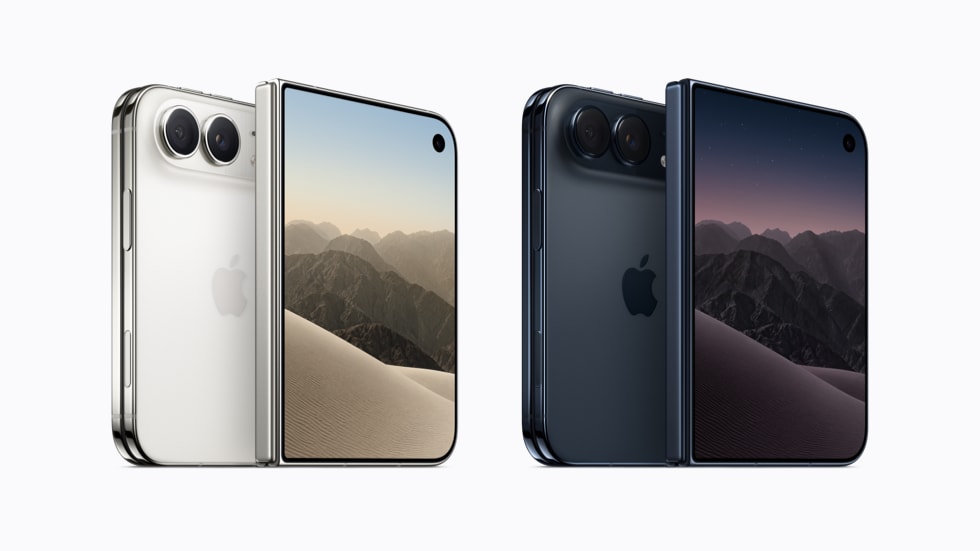
Editorial note: This is a launch explainer and buying guide based on Apple’s published announcements and specifications checked on October 23, 2026. We have not carried out hands-on battery, camera or durability testing. The featured product visual is supplied by Apple Newsroom; the buying checklist is an original Price Perks Hub editorial graphic.
Featured image: Apple / Apple Newsroom. Product visual used for editorial coverage.
iPhone Duo launch: the essentials at a glance
Apple announced iPhone Duo on September 9, 2026. Pre-orders opened on October 16, with availability beginning October 23 in the first group of markets, including India and the United States. The announced U.S. starting price is $1,999 for the entry storage configuration. That is a U.S. price reference, not an Indian retail quote or a promise of current stock.
| Detail | Apple’s published specification |
|---|---|
| Design | Foldable iPhone with inner and outer displays |
| Inner display | 7.6-inch OLED |
| Outer display | 5.4-inch OLED |
| Processor | A20 Pro |
| Storage options | 256GB, 512GB, 1TB and 2TB |
| Colours | Star White and Night Sky |
| Authentication | Side-button Touch ID |
| Starting price | $1,999 in the U.S.; local pricing and taxes vary |
The table is a starting point. A specification can tell you what a device contains; it cannot tell you whether the device fits your hand, your bag, your most-used apps or your budget.
What the folding design could change in everyday use
The point of a foldable is that you do not have to choose one screen size for the entire day. A compact interaction and a longer session can happen on the same device. Think of checking a delivery message while standing in a queue, then opening a larger workspace when you sit down to compare dates, read a document or plan a route.
Start by listing the moments when your current screen feels restrictive. If you regularly zoom into spreadsheets, switch back and forth between a booking confirmation and a calendar, or abandon longer reading because the page feels cramped, those are useful examples. They give you specific tasks to try in a shop rather than relying on the excitement of opening and closing the hinge.
There is another side to that flexibility. A phone is something you carry during all the uninteresting parts of the day, too. You need to be happy holding it while walking, putting it in a pocket and answering a short message without stopping to unfold it. A larger workspace should add convenience without making the ordinary interactions feel like a compromise.
Displays: compare usable space, not just the headline size
Apple lists ProMotion refresh rates up to 120Hz for both screens. Its specification page also gives a device weight of 254 grams and dimensions of 5.2mm when open and 11.3mm when closed. These are manufacturer figures; they do not substitute for an in-person comfort check.
Try reading a familiar website with the text size you normally use. Open a photograph, type a few sentences and look at a page with a mixture of images and text. Notice how much useful material appears without zooming. The most valuable comparison is with something you actually do, not a demonstration that looks striking for thirty seconds.
Screen proportions matter as well as diagonal size. A video, an email thread and a document do not use space in the same way. Ask yourself whether you prefer the layout in front of you, whether the keyboard leaves enough content visible and whether you can comfortably reach the controls. If you use larger accessibility text, repeat the same checks with those settings enabled.
If reflections or the folding area concern you, look at the screen under ordinary shop lighting from several angles. Marketing images and a brightly coloured home screen are poor substitutes for reading a plain page. Your tolerance for a visible fold is personal, so it is worth deciding with your own eyes.
Multitasking and apps: test your own combinations
Apple’s October app update highlights developer support for the Duo and identifies optimised apps with a Made for iPhone Duo badge. The company describes experiences that adapt to different positions and a larger workspace, including entertainment and productivity uses. That is encouraging, but it does not establish that every app you need behaves equally well.
Make a short list before you visit a retailer: your messaging app, banking app, work tools, a streaming service, maps and whichever app you use to read or take notes. Check those first. A beautiful demonstration in an app you never open is less relevant than a clumsy layout in the one you use twenty times a day.
For multitasking, choose a real pairing. Could you keep a travel itinerary visible while sending the meeting point to a friend? Would comparing a product description with a set of notes save you repeated switching? Are both areas large enough to remain useful? The benefit comes from removing friction, not simply from placing two windows beside each other.
Also check whether your employer allows the workflows you have in mind. Managed accounts, sign-in requirements and document restrictions can shape the experience. An excellent personal device does not automatically replace an approved work computer.
Performance: what to look for beyond the chip name
A premium processor gives a phone a strong technical foundation, but a buying decision should still begin with your workload. Someone who mainly uses messages, navigation and occasional photography has different requirements from someone editing large video projects or playing demanding games for extended periods.
If your current phone already feels fast, a new chip alone may not change your day very much. Look instead at the actions you find frustrating: opening a large file, moving between several tasks or exporting a clip. Those are better starting points for a demonstration or an independent review than a general claim that a device is powerful.
Do not assume a thin device will deliver identical sustained performance in every situation. Longer gaming and editing sessions deserve proper testing. Until you have results that match your priorities, treat peak performance claims as one part of the specification rather than a complete account of the experience.
Cameras: useful flexibility, with questions still worth asking
Apple describes a 48MP main camera and 48MP ultra-wide camera, along with an optical-quality 2x option. The folding design also creates different ways to position the phone for a call or a photograph. These are published features, not our assessment of image quality.
For a camera-focused buyer, the practical questions remain familiar. How does moving-subject photography look indoors? Are skin tones pleasing to you? Does video keep detail when the light changes? Is the zoom range appropriate for the photographs you take? A new form factor does not make those questions disappear.
Parents may care more about catching an expression than producing a large file. Travellers may value predictable results across different lighting. People recording short videos may care about handling and sound as much as resolution. Choose the sample images and independent tests that resemble your use, and avoid letting the megapixel count decide everything.
Battery and charging: wait for evidence that matches your routine
There is no single battery result that describes every owner. A day of navigation, photography and mobile data can differ substantially from a day spent mostly on Wi-Fi. A bigger display may be useful precisely because you spend more time looking at it, which makes your personal pattern especially important.
Before upgrading, take a look at your current battery usage. Which apps account for most of it? Do you regularly finish the day with charge to spare, or do you rely on a top-up? Write down your normal routine so you can compare it with the conditions used in a review.
Avoid interpreting manufacturer endurance language as a guarantee that the phone will last through every travel day. We are not assigning a battery score or quoting an unverified real-world runtime here. If endurance is your first priority, waiting for repeatable independent tests is a reasonable buying choice.
Storage: choosing between 256GB, 512GB, 1TB and 2TB
The most useful starting point is the storage screen on your current phone. Separate what you genuinely need from what you have simply never cleared out. Downloaded videos, duplicate files and old app caches should not automatically dictate the next tier you buy.
- 256GB: Consider the entry tier if your present usage leaves comfortable room and you are happy managing downloads.
- 512GB: Compare this tier if you keep a substantial local photo library, several large games or offline media.
- 1TB or 2TB: Evaluate the higher capacities against a specific local-storage requirement, such as large creative projects, rather than treating the largest number as an automatic improvement.
Cloud services can help with some files, but they are a recurring cost and depend on your connectivity and preferred workflow. Local storage can be convenient, but paying for capacity that stays empty is not a saving. Consider the device cost and your likely service payments over the same ownership period.
The total cost: look past the headline payment
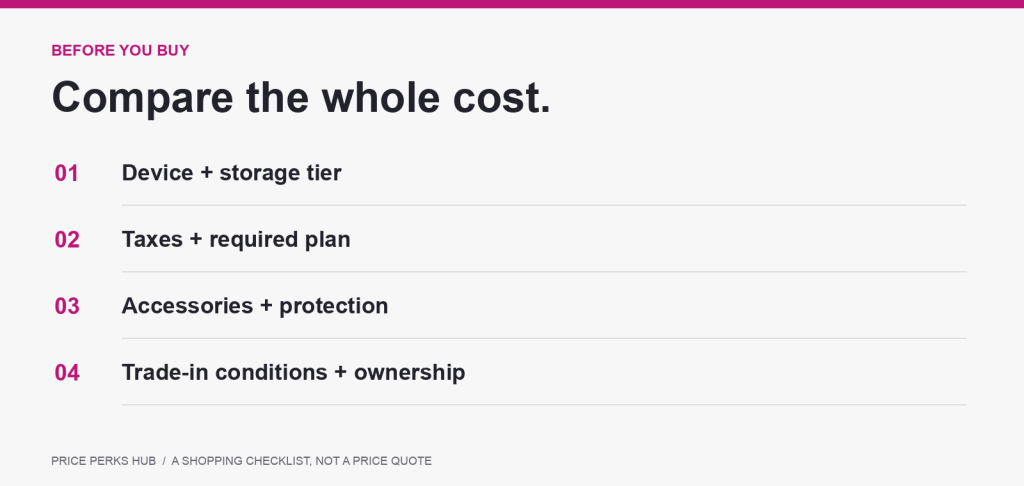
Apple’s October buying information describes trade-in, financing and leasing routes in supported markets. These are different arrangements with different conditions. The lowest advertised monthly figure is not necessarily the cheapest way to own the device, and a leasing payment should not be read as an ordinary purchase instalment.
Build a simple comparison using the same time period for every offer:
- Record the full device price for the storage tier you want.
- Add any required upfront payment, taxes and fees.
- Calculate the total of the monthly payments across the agreement.
- Include any required service plan and compare it with the plan you would otherwise choose.
- Check what happens to the phone at the end: ownership, a further payment, or return.
- Subtract a trade-in credit only after confirming your device’s eligibility and condition requirements.
This is particularly useful when a generous headline saving depends on keeping a more expensive plan. Calculate the plan difference for the full term before deciding how much you are saving. Also read what happens if you leave early, change providers or fail to meet the trade-in conditions.
For India and other markets, use the local checkout and the seller’s written terms. Do not convert the U.S. price into another currency and assume that is the local retail price. Regional taxes, configurations and offers need their own verification.
Cases, protection and repair: budget for the whole purchase
A new phone shape deserves a fresh accessory check. Do not assume a case, stand or mount that worked with your previous phone will suit this one. Think through how you use the device in the car, at a desk, while travelling and when taking a call hands-free.
If you are considering protection cover, compare the premium with the service fees, exclusions and repair arrangements that apply in your market. A policy’s name is less useful than its actual terms. Ask where service is available and what you would do if your phone needed attention during a trip.
For a foldable, it is also sensible to understand the recommended care routine for the inner display and hinge. Follow the manufacturer’s guidance rather than assuming every cleaning method or screen protector is appropriate. This is a practical ownership question, not a prediction that the phone will fail.
Who should put iPhone Duo on the shortlist?
The frequent reader or planner: If you routinely read documents, organise trips or compare several pieces of information on a phone, the extra workspace may solve a problem you already recognise. Test those exact tasks before paying the premium.
The user who wants fewer devices in the bag: Someone carrying a phone and a small tablet may be interested in a different balance. Compare the activities individually, though. A folding phone does not automatically replace every tablet task or accessory.
The technology enthusiast with a clear budget: Enjoying a new design is a valid reason to be interested. The important distinction is whether the price is comfortable without depending on an optimistic resale value or a discount you have not qualified for.
Who might be better off waiting?
If your current phone still does everything you need, there is no requirement to upgrade on launch day. Waiting gives you more time to examine independent testing, app updates and the practical experience of longer-term owners.
You may also prefer to wait if camera performance at a particular focal length, all-day travel endurance or a specific work app is essential to you. Those are concrete requirements that deserve concrete evidence. A launch specification alone cannot settle them.
Finally, if a conventional phone is easier to hold, cheaper to buy and already large enough for your routine, it remains a strong option. The right purchase is the one you enjoy using after the novelty has worn off.
A five-minute in-store checklist
- Use the outer screen for a message and a short search before opening the phone.
- Read a familiar page at your normal text size on the larger display.
- Try the keyboard with both hands and in the position you would normally use.
- Open two apps that you genuinely want to use together.
- Inspect the screen under ordinary lighting and from different angles.
- Check the closed shape and weight against the pocket or bag you normally carry.
- Ask about the exact configuration, delivery estimate, return terms and local service arrangements.
For a wider accessory checklist, read our guide to shopping for phone accessories. If you are comparing several stores, our shopping and savings guides can help you organise the comparison.
iPhone Duo questions buyers are asking
Is the iPhone Duo release date the same as its announcement date?
No. Announcement, pre-order and availability dates describe different stages. The launch timeline is set out near the top of this guide. Availability beginning on a date does not guarantee that every configuration is immediately available at every retailer.
Is this a hands-on iPhone Duo review?
No. It is an independently written launch explainer and shopping guide using Apple’s published information. We have not tested the device, so we are not presenting battery scores, camera rankings or a durability verdict.
Should I choose the highest storage capacity?
Only if your expected local-storage needs justify the extra cost. Check your present usage, the files you want to keep and any cloud subscription you already pay for before choosing a tier.
Does the U.S. starting price tell me what I will pay in India?
No. Use the local price for the exact storage option and check taxes, seller terms and any offer requirements. A currency conversion is not a verified Indian price.
Should I buy immediately or wait?
If the design clearly solves an existing problem and the full cost is comfortable, arrange a demonstration and compare the terms. If you are still unsure what you would use the extra screen for, waiting is a sensible way to avoid an expensive impulse purchase.
Our buying perspective
iPhone Duo is most interesting when you treat the larger workspace as a tool for something specific. A better view of your documents, easier planning or a more comfortable reading session is a stronger reason to buy than the fact that the device folds.
Go into the comparison with three things written down: the tasks you want to improve, the maximum total cost you are comfortable with and the evidence you still need. That turns a major launch into a manageable shopping decision.
Research notes: Apple Newsroom’s September 9 introduction, October 15 availability and payment update, October 22 app-experience update, and iPhone Duo technical specifications. Checked October 23, 2026. Manufacturer claims are identified as such; purchasing advice is our editorial analysis. Apple and iPhone are trademarks of Apple Inc. Price Perks Hub is an independent publication.